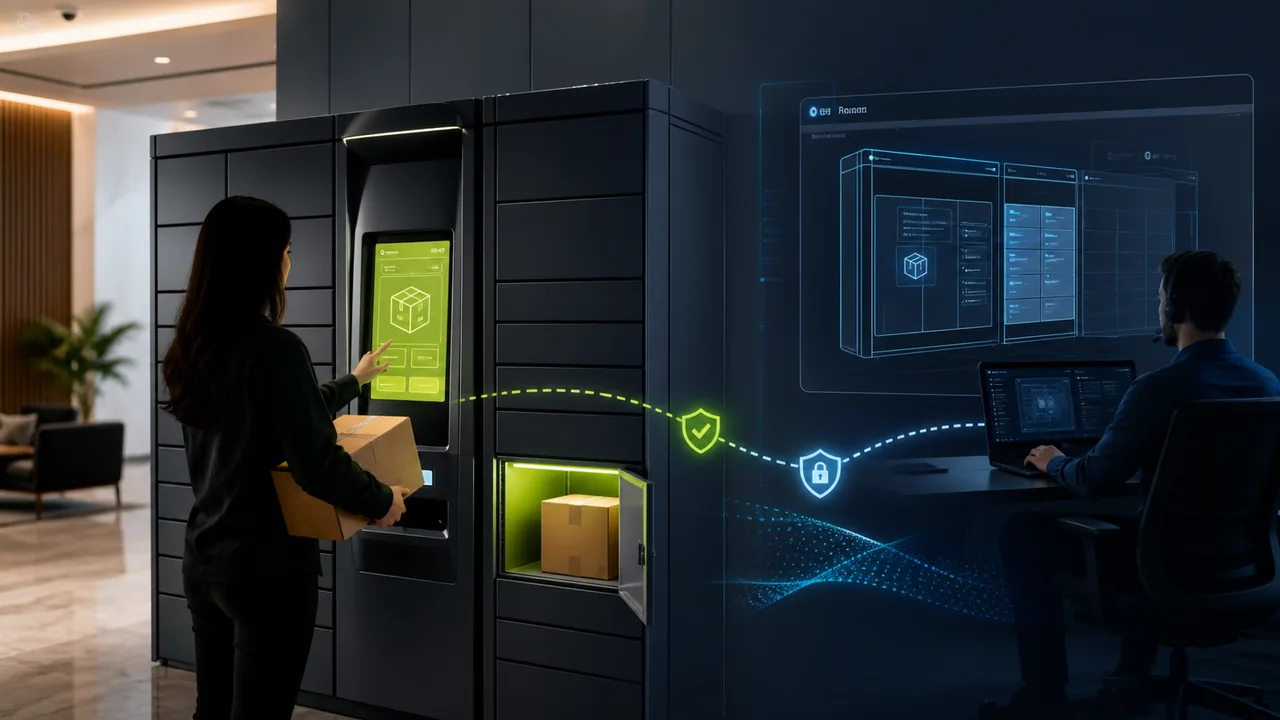
Unattended smart terminals are entering more and more offline scenarios: smart parcel lockers, vending machines, hotel self-check-in kiosks, hospital queue ticket machines, store member screens, factory scanning terminals, parking payment screens, and campus device lending terminals. They typically run on Android devices locked into one or a few business apps, commonly known as kiosk mode or dedicated device mode.
For enterprises, the real challenge isn't "getting an app to display on the terminal," but keeping hundreds or thousands of terminals deployed in different locations running stably over the long term. Network anomalies, app freezes, account expirations, configuration errors, order status sync failures, printer or scanner disconnections, excessive cache, and version update failures—all of these can happen. As long as the terminal serves real users, every maintenance action is not just a technical move; it also impacts queues, fulfillment, complaints, and on-site labor costs.
Traditional remote control tools solve the question: "Can I remotely see the screen and operate it?" But unattended smart terminals need to answer another question: When maintenance personnel handle issues in the background, can users still continue to use the terminal?
This is the key difference between Teralivo and many remote control or MDM solutions. Teralivo's focus is not simply taking over the foreground screen, but performing remote background operations on apps on authorized enterprise Android terminals, allowing maintenance personnel to handle device and business issues without taking over the kiosk screen the user is currently using.
The Core Conflict of Unattended Terminals: Device Online, But Screen Cannot Be Occupied Arbitrarily
Enterprise kiosk terminals are different from office computers. When remotely maintaining an office computer, employees can pause for a few minutes; but devices like smart parcel lockers, vending machines, and hospital queue machines face a continuous stream of users. The terminal screen itself is the service entry point.
Take a smart parcel locker as an example. When a user approaches the locker, they usually want to complete a few simple actions:
- Enter the pickup code or scan a QR code;
- Confirm the parcel information;
- Open the locker door;
- Retrieve the parcel;
- Close the door and leave.
If a maintenance operator takes over the screen via a regular remote control tool at this moment, the user might no longer see the pickup interface but instead see the settings page, backend management page, file manager, system pop-ups, or the operator's clicks. Even if the maintenance only lasts 3 minutes, it could cause users to be unable to pick up parcels, longer queues, increased customer service calls, or even be mistaken for a locker malfunction.
Therefore, the first principle of unattended terminal maintenance is not "can remote control," but: Try not to interrupt the foreground business.
Problems with Ordinary Remote Control: Maintenance Actions Occupy the User Interface
Enterprise mobile device management products like AirDroid Business typically highlight capabilities such as Android device management, kiosk mode, remote control, app management, unattended access, and device monitoring in their public materials. These capabilities are valuable for enterprise terminal management, especially for bulk deployment, app locking, device status viewing, remote assistance, and handling devices that are already malfunctioning.
However, in unattended kiosk scenarios, the traditional "remote view and control screen" mode has a natural limitation: the remote control object is usually the foreground interface currently displayed to the user.
This means that when a maintenance operator needs to open settings, switch apps, view logs, re-login to the business backend, modify configuration, or clear abnormal states, the foreground screen is easily occupied by maintenance actions. For a smart parcel locker, this is equivalent to temporarily taking the locker offline; for a vending machine, it forces customers to pause their purchase; for a hospital queue machine, it halts the queue progress.
This mode is not unusable, but it is more suitable for two situations:
- The terminal is already unused, or on-site personnel confirm maintenance is allowed;
- The terminal is already malfunctioning and the foreground business is unavailable.
If the device is serving users, directly taking over the foreground screen incurs hidden downtime costs.
Teralivo's Difference: Remote Background App Operations, No Foreground Screen Takeover
Teralivo is more suitable for enterprise unattended smart terminal maintenance because it advances remote maintenance from "taking over the user's screen" to "handling the app and business state on the terminal in the background."
On authorized enterprise devices, maintenance operators can enter a maintenance channel through the Teralivo backend to handle business apps, management apps, or auxiliary tools on the terminal, without exposing the maintenance interface to the kiosk screen the user is currently operating. The user still sees the original pickup, purchase, ticket, or inquiry interface and continues their operation.
Still using the smart parcel locker example:
- The user is normally scanning and picking up parcels at the locker;
- The maintenance operator checks the connection status of the parcel locker app in the background;
- The operator views a specific locker door status, order sync status, or error logs;
- The operator refreshes configuration, restarts business connections, or handles stuck tasks;
- The foreground pickup process is not switched to system settings or maintenance pages.
This capability is very important for unattended terminals. Because what enterprises really want to reduce is not "the cost of remotely connecting to a device once," but "the cost of interrupting real users each time maintenance occurs."
Smart Parcel Locker Case: How Expensive Is a 5-Minute Maintenance?
Many enterprises underestimate the user-side cost of kiosk maintenance. We can calculate it with a simple model.
Suppose a smart parcel locker has 300 pickups per day, and during peak hours 60 pickups per hour, which means about 1 user arrives per minute. If remote maintenance needs to occupy the foreground screen for 5 minutes, it would theoretically affect about 5 users.
These 5 users might experience several outcomes:
| Cost Item | Calculation Method | Example |
|---|---|---|
| User waiting cost | Number of affected users × Average waiting time | 5 people × 5 minutes |
| Customer service cost | Number of inquiries × Cost per inquiry | 2 inquiries × 8 CNY |
| On-site handling cost | Whether on-site staff is needed | 1 time × 20 CNY |
| Fulfillment risk | User not picking up, repeat visits, complaints | Difficult to quantify precisely |
| Brand damage | Users perceive the locker as "unstable" | Long-term accumulation |
If an enterprise has 2,000 lockers, and each locker experiences only 1 issue requiring remote maintenance per week, with each maintenance occupying the foreground for 5 minutes, then that is 10,000 minutes of potential foreground unavailability per week. Converted, that's equivalent to 166 hours of user service window occupied by maintenance actions per week.
This does not yet account for peak-hour queues, customer service calls, on-site assistance, second deliveries, user complaints, and relationship costs with service points.
If the maintenance method is changed to background remote app operations, where foreground users can still pick up normally, then these 166 hours do not disappear entirely because the maintenance operator still works; but they are no longer translated into user-side downtime. That is the business value of background remote maintenance.
Cost Formula: Don't Just Calculate Engineer Time, Also Calculate User Interruption
When evaluating remote maintenance tools, enterprises often only compare software prices or engineer efficiency. For example, cost per device per month, whether it supports remote control, whether it supports kiosk mode, or whether bulk deployment is possible.
But for unattended terminals, a more reasonable cost formula should be:
Total cost per maintenance operation =
Engineer handling-time cost
+ User-facing interruption cost
+ Customer service and on-site assistance cost
+ Order, fulfillment, complaint, and brand costs
Ordinary remote control tools mainly reduce the first item—engineers don't need to go on-site. But if the maintenance process occupies the screen, it still amplifies the second and third items.
Teralivo's advantage is reducing both parts simultaneously:
- Reduce on-site dispatch, cutting engineer and travel costs;
- Reduce foreground interruption, cutting user waiting, complaint, and fulfillment costs.
This difference is more pronounced in industries with higher user volumes, more dispersed devices, and more difficult on-site intervention.
Which Scenarios Most Need Background Remote Maintenance?
The value of background remote app operations is most evident in the following types of devices:
| Terminal Type | Foreground User Behavior | Biggest Fear During Maintenance |
|---|---|---|
| Smart parcel locker | Scanning, picking up, opening doors | Users unable to pick up, on-site queues |
| Vending machine | Selecting products, paying, dispensing | Payment interruption, order anomalies |
| Hospital queue machine | Registering, taking tickets, printing slips | Queue congestion, increased window pressure |
| Hotel self-check-in kiosk | Identity verification, selecting room, making card | Check-in peak blocked |
| Parking payment terminal | Entering license plate, paying, exiting | Exit congestion |
| Factory scanning terminal | Scan reporting, quality inspection entry | Production rhythm interrupted |
| Store member screen | Checking points, receiving coupons, redeeming | Store staff forced to intervene |
These terminals share a common characteristic: the device screen is the business entry point. If remote maintenance takes over the screen, it effectively takes over the business.
Comparison with Solutions Like AirDroid Business
The following comparison is based on typical capabilities described in public materials and common needs in enterprise kiosk maintenance. Actual capabilities may vary by product version, licensing method, and device model; enterprises should verify through actual testing during selection.
| Comparison Item | AirDroid Business and Similar Traditional MDM/Remote Control Solutions | Teralivo Background Remote Maintenance |
|---|---|---|
| Core approach | Device management, kiosk lockdown, remote screen view and control | Background app operations and maintenance channel on authorized terminals |
| Suitable scenarios | Bulk deployment, device monitoring, foreground remote assistance, malfunctioning device takeover | Maintenance of unattended terminals currently serving users |
| Impact on user foreground | Remote control usually occupies the current screen | Maintenance actions do not directly take over the kiosk interface the user is using |
| Smart parcel locker maintenance | May require pausing user pickups or waiting for idle windows | While users pick up, background handles connection, configuration, logs, and business state |
| Cost advantage | Reduces on-site dispatch cost | Reduces both on-site dispatch cost and user interruption cost |
| Risk points | Screen takeover during peak hours may cause queues and complaints | Requires device authorization, maintenance permission boundaries, and operation auditing |
| Most suitable devices | Terminals with scheduled maintenance windows | Terminals with high usage frequency, dispersed deployment, and difficult on-site intervention |
This is not to say that solutions like AirDroid Business have no value. They have mature capabilities in Android kiosk lockdown, device policies, app distribution, and traditional remote support. The issue is that when the business goal shifts from "remotely controlling the device" to "remotely maintaining without affecting user usage," background maintenance capability becomes a more critical selection criterion.
Why Kiosk Mode Alone Doesn't Solve Maintenance Interruption?
Android Enterprise's lock task mode can lock a device into a single app or an allowlisted set of apps, suitable for building dedicated devices and kiosk experiences. Google's Android Management API also provides kiosk-related policies to make specified kiosk apps enter full-screen lock mode automatically after device startup.
However, kiosk mode mainly addresses "the user cannot leave the business app," not "the maintenance operator can maintain the business app without affecting the user."
These two concepts are easily confused.
Kiosk mode keeps the user within the foreground business process, preventing accidental system settings access, browsing unrelated web pages, or opening other apps. Remote maintenance requires an administrator to enter a different perspective: view device status, handle anomalies, modify configurations, perform diagnostics, restart connections, and read logs. Traditional methods often need to switch the foreground screen; background maintenance attempts to separate these actions from the user interface.
Therefore, for enterprise unattended smart terminals, kiosk mode is the foundation, while background remote maintenance is the key to reducing interruption costs.
What Metrics Should Enterprises Focus on When Deploying?
When evaluating an unattended terminal maintenance system, it's not recommended to only ask "can it remotely control?" Rather, you should ask these questions:
- When performing remote maintenance, will the foreground kiosk interface that the user is currently using be interrupted?
- Does it support connecting to the device in unattended mode?
- Can it handle business apps, configurations, logs, and connection status in the background?
- Can it differentiate maintenance permissions to prevent ordinary customer service from accidentally operating system-level functions?
- Does it have operation logs for tracing who handled which device and when?
- Can it restore connections or retain necessary device state when the network is unstable?
- Can it integrate with existing ticketing, alerts, device grouping, and asset systems?
- Can it complete binding and maintenance without installing a persistent app?
These questions are closer to real business costs than simply comparing "whether remote desktop is supported."
What Background Remote Maintenance Cannot Replace?
Background remote maintenance is not a panacea. It is suitable for reducing foreground interruptions and on-site dispatches, but it cannot replace all terminal management capabilities.
If the device hardware is damaged, the locker door motor is stuck, the scanner is disconnected, the printer is out of paper, the payment peripheral is faulty, or the network is completely down, on-site personnel may still be needed. If the business app itself does not have a background maintenance entry, or certain operations must be performed on the foreground, the specific app design must be evaluated.
Enterprises also need to establish permission and compliance boundaries. Unattended terminals are usually in public spaces and may handle user phone numbers, order IDs, payment status, pickup codes, or identity information. The background maintenance system must restrict account permissions, retain operation audits, and avoid using remote capabilities for unauthorized monitoring.
In other words, Teralivo's advantage is enabling enterprises to remotely complete maintenance on legally authorized devices with lower interruption, not bypassing business systems, permission policies, or on-site security processes.
Conclusion
The maintenance competition for enterprise unattended smart terminals is shifting from "can we remotely control the device" to "can we remotely solve problems without affecting users."
Traditional MDM and remote control solutions like AirDroid Business are suitable for device lockdown, bulk management, and remote takeover. But when the terminal is serving users, taking over the foreground screen itself can become a new business interruption.
Teralivo's value lies in background remote app operations: maintenance personnel can handle business anomalies on Android kiosk terminals such as smart parcel lockers, vending machines, and queue ticket machines, while users continue to complete pickups, purchases, ticket taking, or inquiries on the foreground. For large-scale deployments, this is not just an experience optimization but a maintenance advantage that can be directly factored into cost models.
If a remote maintenance system only saves the time engineers spend on-site but shifts the maintenance cost to user waiting and customer service complaints, it has only done half the job. A truly suitable solution for unattended terminals should keep both devices maintainable and services uninterrupted.